
Case Study, Frontend Engineering
Gundry MD®
Rebuilt a high-traffic wellness e-commerce site from high-fidelity Figma designs into Builder.io, with dynamic product data powered by an Angular + Salesforce backend.
Builder.io Angular Salesforce Figma → Production Lead FE Engineer
Project Overview
As Lead Frontend Engineer, I oversaw the complete rebuild of gundrymd.com, a high-traffic health supplement e-commerce website. Working from finalized high-fidelity Figma designs delivered by the design team, I formulated the process to take key pages from comps into production-ready Builder.io components while managing a team of 2 supporting frontend engineers and coordinating with backend developers on Salesforce data integration requirements.
The build prioritized performance, CRO, and accurate display of dynamic product data, including tiered pricing, subscription options, and member pricing. This was served from a Salesforce backend through a proprietary Angular integration layer.
Implementation
From Figma to Builder.io
The design team supplied the approved Figma design system and page layouts. Working with the Creative Director, I planned the frontend implementation and translated the key pages, shared product detail template and filtering system into reusable Builder.io components. I coordinated two supporting frontend developers and worked with backend partners on the Angular and Salesforce data handoff.
Separating content from frontend components in Builder.io let the marketing team update product content in the visual editor while the engineering team maintained the shared layout and data integration.
Each Builder.io component was registered as a custom element, enabling reusability across product pages while maintaining design system consistency:
// Registering a Builder.io custom component
Builder.registerComponent(ProductHero, {
  name: 'ProductHero',
  inputs: [
    { name: 'productTitle', type: 'string' },
    { name: 'heroImage', type: 'file', allowedFileTypes: ['jpeg','png'] },
    { name: 'tagline', type: 'string' },
    { name: 'showCTA', type: 'boolean', defaultValue: true },
  ],
}); 
Dynamic Data Integration
Product Detail Page
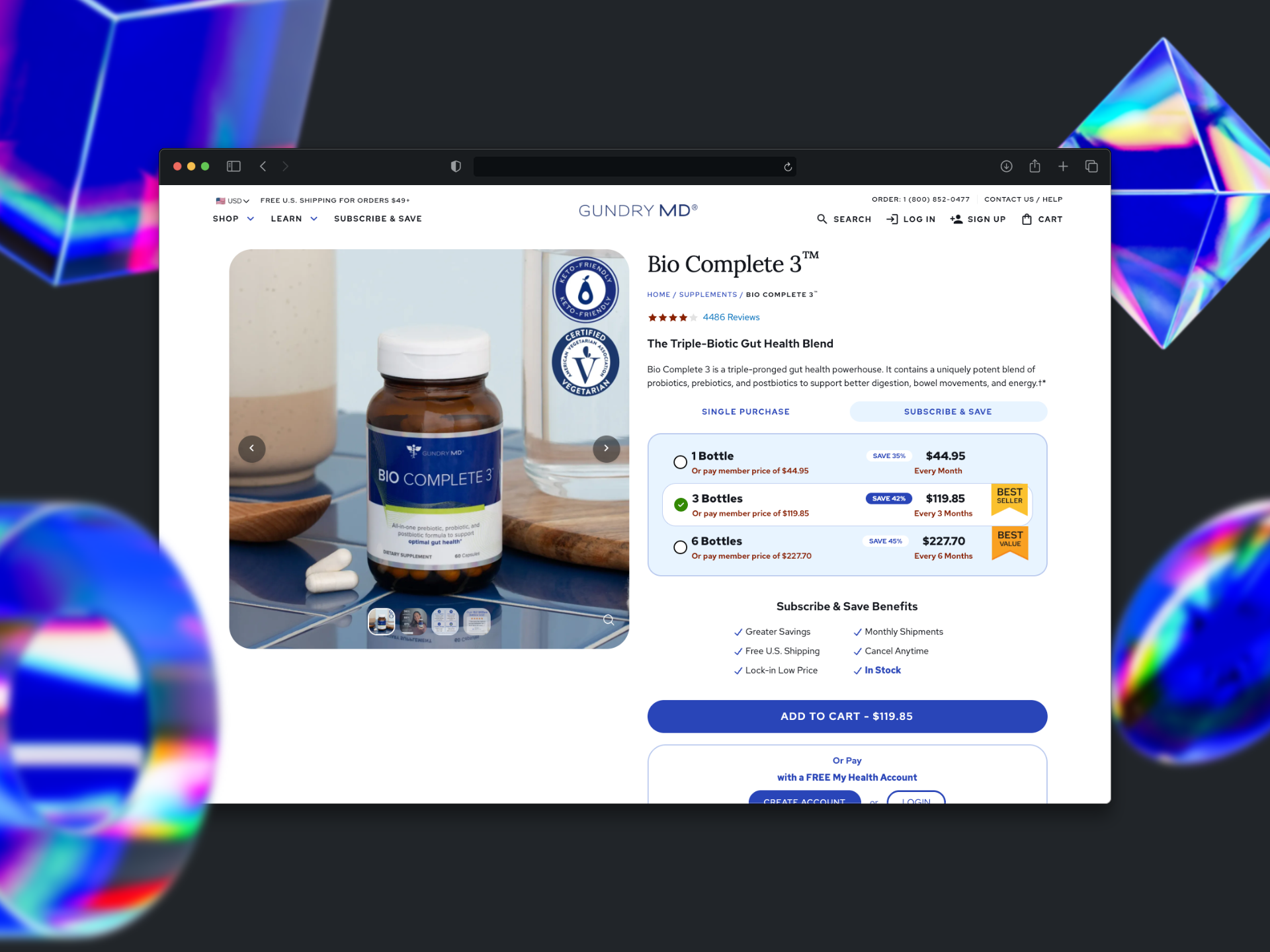
The most technically complex feature of the build was the product detail page (PDP). Each product required a dynamic, data-driven component that displayed tiered purchasing options (1 jar / 3 jars / 6 jars), subscription pricing, and member “Account Price” data served live from Salesforce.
Using Angular’s reactive forms and RxJS observables, the product selector component subscribed to real-time pricing streams from the Salesforce API. Selecting a quantity tier or toggling “Subscribe & Save” instantly updated the displayed price, savings badge, and add-to-cart CTA without a page reload.
I coordinated directly with backend developers to ensure proper data handoff to the frontend, specifying payload so the Angular service layer could map it cleanly to the Builder.io component’s drag and drop layout system.
// Angular product pricing service
@Injectable({ providedIn: 'root' })
export class ProductPricingService {
  private readonly endpoint = '/api/v2/salesforce/pricing';

  getProductPricing(sku: string): Observable<ProductPricing> {
    return this.http.get<RawPricing>(`${this.endpoint}/${sku}`).pipe(
      map(raw => ({
        tiers: raw.tiers.map(t => ({
          quantity: t.qty,
          retailPrice: t.price,
          accountPrice: t.member_price,
          subscribePrice: t.subscribe_price,
          savingsPercent: Math.round((1 - t.subscribe_price / t.price) * 100),
          isBestSeller: t.qty === 3,
        })),
        defaultTier: raw.default_tier_index ?? 1,
      })),
      catchError(err => this.handlePricingError(err))
    );
  }
}
Results
Performance optimization was baked in throughout the build, not treated as a final polish step. Key techniques included proper image sizing and next-gen format delivery via Builder.io’s built-in CDN, lazy loading for below-fold product imagery, code-splitting for the Angular pricing service, and eliminating render-blocking resources. The result was a measurable 10–20% improvement in Google PageSpeed Insights scores across the entire site.
See It Live
Experience the Full Site
Browse the live site to explore the product pages, subscription flows, and dynamic pricing system built for this project.